Gifts for Podcasters That Actually Get Used
Twelve gifts for the podcast host on your list, from the mic sitting on half the studio desks in the country to the arm that keeps it out of the shot.
I have bought podcast gear for friends, and I have received plenty of it too. Here is what I have learned about what survives. The custom mug with your friend's show logo on it gets used for exactly one episode. The lapel mic bought in a panic gets returned. What lasts is the boring-looking stuff in the middle of the desk: a microphone that stops picking up the refrigerator hum, a boom arm that keeps the mic out of the webcam shot, a pair of headphones that makes editing at midnight bearable. That is what this list is made of.
Every product here is something a working podcaster, streamer, or video host would genuinely put on their desk. I read hundreds of reviews across Reddit's r/podcasting, studio tour videos, and the giant Amazon review counts behind each pick, and I picked twelve items that cover the whole journey, from the ten dollar stocking stuffer to the piece of gear that changes how someone's show sounds. Nobody on this list needs to be a professional to use any of it, and none of it is a toy they will shelve by February.
Shure MV7X XLR Dynamic Podcast Microphone

If I could hand a new podcaster one box, this would be it. The MV7X is the XLR-only sibling of the mic you have seen on every studio tour video, tuned specifically for spoken voice. It is a dynamic microphone, which matters more than any spec sheet explains: dynamics ignore the room. Refrigerator hum, the dishwasher, a roommate on a call two rooms away, all of that fades while the voice stays forward. I have heard recordings from people who moved from a condenser to this mic, and the difference is not the voice getting better, it is the room disappearing.
The built-in yoke makes positioning easy, and it sits on a boom arm without fighting you. Owners keep mentioning the same two things in reviews. First, it needs real gain, so pair it with an interface that has decent preamps or add an inline booster like the Cloudlifter further down this page. Second, the sound is forgiving of imperfect technique, which is exactly what a beginner needs. For someone starting their first show in an apartment, this is the best microphone gift you can give, and for a friend who has outgrown their USB mic, it is the upgrade they have been circling in a cart for months. It is the mic I would buy my own brother if he told me he finally started that true crime show he keeps describing.
What People Love
- Purpose-built for spoken voice, ignores room noise
- Legendary Shure build quality that lasts decades
- Forgiving of beginners' positioning and technique
- Same sound signature as the famous SM7B at a friendlier price
Things to Consider
- XLR only, so it needs an audio interface to work
- Needs extra gain, budget interfaces can leave it quiet
- No mute button or headphone jack on the mic itself
Best for: The dedicated host who is serious enough to own an interface and wants broadcast sound
Check current price and availability
View on Amazon →Rode PodMic XLR Broadcast Microphone
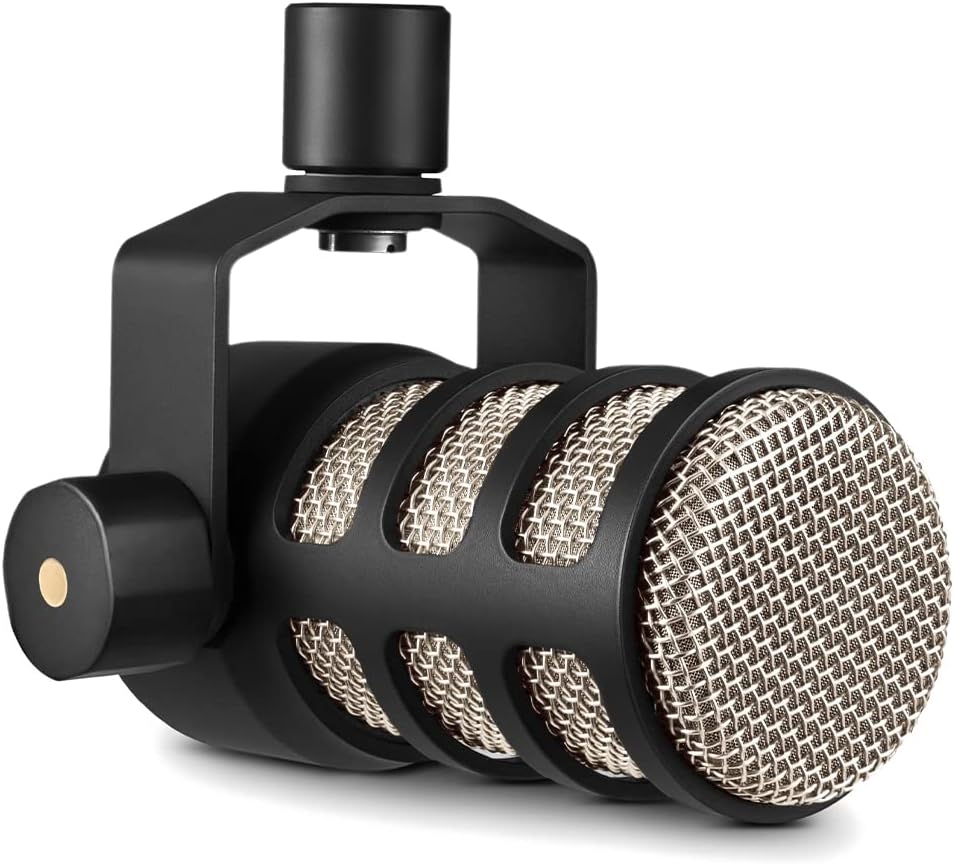
The PodMic is the answer when someone wants radio sound on a kitchen table budget. It is a dense little tank, brass construction with an internal pop filter and a built-in swing mount, and it has become the default recommendation on every podcasting forum for a reason. Out of everything on this page, this is the mic I hear about most from people who record interviews at home. The sound sits right in that NPR-ish broadcast zone, warm and close, and because the mount is integrated there is no fiddling with extra shock hardware.
What sells me on it as a gift is the rating: nearly seven thousand reviews averaging 4.8 is remarkable for audio gear, where people argue about everything. The complaints that do exist are consistent, so let me be honest about them. It is heavy, so a flimsy desk stand will tip, meaning it genuinely wants the PSA1+ arm further down this list. And like the Shure, it is XLR, so a total beginner will need an interface too. If your person already has an interface, though, this is the best budget XLR podcast microphone you can put in their hands, and it makes a striking birthday gift for a friend who records interviews at the kitchen table and deserves to sound like a network show instead of a laptop webcam.
What People Love
- Broadcast sound at a beginner price
- Internal pop filter and swing mount included
- Solid metal build, made to be repositioned daily
- One of the highest-rated mics in its class
Things to Consider
- Heavy, needs a proper boom arm or sturdy stand
- XLR only, no USB for laptop-only beginners
- Tuned very close and warm, not ideal for distance recording
Best for: The interviewer on a budget who wants their show to sound like a broadcast network
Check current price and availability
View on Amazon →Samson Q2U USB/XLR Recording and Podcasting Pack

If I had to pick one gift for a total beginner, the Q2U pack would be it, and I do not say that lightly. This box removes every excuse. The mic runs on USB straight into a laptop today, and when your person gets serious and buys an interface later, the same microphone keeps working over XLR. Nothing else on this page can make that promise. The pack also includes headphones, a foam windscreen, a desk stand, and the cables, so it is a complete podcasting starter kit for a teenager or a friend who keeps saying they will start a show someday. They can be recording an episode twenty minutes after unwrapping it.
The Q2U has been the budget recommendation in podcasting circles for over a decade, and the reviews back it up: dynamic capsule, so it forgives untreated rooms; a headphone jack on the mic itself for zero-latency monitoring; and a simple, durable build that survives being tossed in a backpack for remote recordings. The honest trade-off is sound quality. It is good, clean and clear, but the PodMic and MV7X above it sound fuller and richer. That is the right trade for a starter gift, though, because the Q2U never blocks the upgrade path. I have watched two different friends start their shows on exactly this pack, and both still use the same mic years later. As a gift for a teen who wants to start a podcast, nothing else comes close.
What People Love
- USB now, XLR later, so the mic never becomes obsolete
- Headphones, stand, and cables included in the pack
- Headphone jack on the mic for direct monitoring
- Proven budget pick with a decade-long track record
Things to Consider
- Sound is good but not as rich as pricier XLR mics
- Included headphones are basic
- Desk stand feels light if you bump the desk
Best for: The complete beginner, the teenager with a show idea, and anyone who hates buying accessories separately
Check current price and availability
View on Amazon →Zoom ZDM-1 Podcast Mic Pack

Zoom makes the recorders that half the podcast world runs on, and their ZDM-1 pack is their take on the starter bundle, aimed squarely at someone who wants a complete setup in one box. You get a dynamic broadcast microphone in the SM7B style, a boom-style desk stand, headphones, a windscreen, and an XLR cable. The reviews sit at a strong 4.6 with over six hundred ratings, and what owners praise most is that the pieces do not feel like throwaways. The mic sounds punchy and close, the headphones are genuinely usable for editing, and the stand holds the mic at a proper talking angle instead of the tilt-back look most bundled stands have.
I rate this slightly differently from the Samson pack above it. The Q2U is the better pick if your person might stay USB forever. The ZDM-1 pack is the better gift if your person already knows they are going the XLR route, because everything in the box is XLR-native and the mic itself is a step up in broadcast character. It is a particularly good gift for a college student starting a campus podcast, since the whole rig fits in a dorm drawer and needs exactly one purchase afterward if they expand: an interface. If you want to hand someone a complete podcast studio as a single gift, this is the box that does it with the fewest compromises.
What People Love
- Every accessory needed for an XLR setup in one box
- Punchy broadcast-style dynamic mic
- Bundled headphones are actually good enough to edit on
- Desk stand has a proper mic-stand angle
Things to Consider
- XLR only, an interface is required and not included
- Fewer long-term reviews than older budget picks
- Windscreen is foam, not a true pop filter
Best for: The student or starter who wants the whole XLR studio in a single box
Check current price and availability
View on Amazon →Rode NT-USB Mini Studio Condenser Microphone

Not everyone on your list wants a broadcast setup. Some just want their voice to sound dramatically better on calls and recordings, with nothing to learn, and the NT-USB Mini is the gift for that person. It is a USB condenser from Rode, a company that treats a budget mic with the same seriousness as their studio line, and it plugs into any laptop with one cable. No interface, no XLR, no phantom power. The magnetic stand detaches, the built-in pop shield handles plosives, and the included software gives them a studio-grade compressor, noise gate, and EQ that runs quietly in the background. In practice, a person who knows nothing about audio ends up sounding like they know a lot about audio.
With over five thousand reviews at 4.5 stars, this is one of the most proven USB mics on the market, and it is the mic I recommend when someone asks for a studio quality microphone under a hundred dollars. The one real drawback is that a condenser hears the room, so in an echoey apartment it will pick up more of the space than a dynamic mic would. For a quiet bedroom studio or a treated corner that is fine, and Rode's software gate cleans up most of it. As a gift for a gamer who wants their Discord voice to sound as good as their stream looks, or a friend whose podcast is a laptop-and-headphones operation, it lands perfectly. They unwrap it, plug in one cable, and their voice is immediately better. That is a rare kind of gift.
What People Love
- One cable, works instantly with any laptop
- Rode's software DSP adds compression and gating free
- Magnetic stand detaches for travel
- Built-in pop shield and tripod in the box
Things to Consider
- Condenser picks up room echo more than a dynamic would
- No headphone volume control on the mic body
- Desktop footprint invites desk knocks
Best for: The laptop podcaster, gamer, or remote worker who wants better sound with zero setup
Check current price and availability
View on Amazon →Rode PSA1+ Professional Studio Boom Arm

Here is a gift nobody buys themselves and everybody notices. A boom arm is the piece of hardware that makes a desk look and function like a studio: the mic floats beside the mouth instead of squatting on the desk, it swings out of the way when not in use, and it never appears in the webcam shot. The PSA1+ is Rode's heavy-duty version, built with springs that are damped so the arm does not twang when you bump it, and rated to hold microphones far heavier than any mic on this page. Owners of the notoriously heavy Shure SM7B specifically buy this arm because cheaper arms slowly sag under that weight. It also routes the cable internally, so there is no XLR cable flapping around in the webcam frame.
I have watched cheap arms die in exactly the same way: the springs wear out, the joint loosens, and the mic does a slow dive toward the desk mid-episode. The PSA1+ is the one people stop replacing. The review count, 2,661 at 4.7 stars, is remarkable for an accessory, and the recurring praise is that it feels like studio furniture rather than an accessory. If your person already owns a good microphone, this is arguably the highest-impact upgrade you can give them, and it is the gift I would pick for a streamer who records video podcasts and is tired of their arm or desk clutter showing on camera. It turns the setup they have into the setup they screenshot from other people's studios.
What People Love
- Holds heavy broadcast mics without sagging
- Silent, damped springs so desk bumps stay out of the recording
- Internal cable routing keeps the shot clean
- Full desk-mount hardware included
Things to Consider
- Priced like real gear, not an impulse add-on
- Overkill for lightweight USB mics
- Mount needs about an inch of clear desk edge
Best for: The streamer or video podcast host whose current arm sags, squeaks, or photobombs the shot
Check current price and availability
View on Amazon →Focusrite Scarlett Solo 4th Gen USB Audio Interface

The Scarlett Solo is the doorway into real recording, and it is the gift that unlocks every XLR product on this page. Plug it into a laptop over USB, plug any XLR microphone into the front, and the computer suddenly has a professional preamp where the dainty mic input used to be. Focusrite has dominated this exact niche for a decade, and the 4th generation fixed the two complaints people used to have: the preamps now carry serious clean gain, enough for low-output dynamics like the Shure, and the Air mode adds a touch of brightness that flatters spoken voice. The 4.6 rating across nearly three thousand reviews is what happens when a product quietly does its job for years.
Who is this for? Someone who already owns an XLR mic and is plugging it into the wrong jack. Someone recording audiobook auditions, voiceovers, or a two-person interview show who keeps saying their sound is almost there. This is the first audio interface gift I would give a voice actor or a podcast host who is outgrowing USB, and the 4th gen version runs over USB-C, so it works with modern laptops with no adapter. The Solo handles one mic and one instrument input, which is exactly enough for a solo podcaster; for a two-mic interview show the 2i2 is the step up. The con is honest: it is a component, not a complete gift, so it needs an XLR mic to make sense. Paired with the PodMic, it is the combo I would hand any serious beginner.
What People Love
- Clean, quiet preamps with genuinely useful gain
- Air mode flatters spoken voice recordings
- Bus-powered over USB-C, no power brick
- The brand every studio engineer recognizes
Things to Consider
- Only one mic input on the Solo model
- Requires an XLR mic, not a gift for USB-only setups
- No onboard effects like some newer interfaces
Best for: The XLR mic owner who is ready to record properly, from voice actors to interview hosts
Check current price and availability
View on Amazon →Cloudlifter CL-1 Mic Activator

This is the most insider gift on the page, and the podcaster in your life will know exactly what it is the moment they see the box. Here is the problem it solves. Low-output dynamic mics, most famously the Shure SM7B that sits on half the professional podcast desks in the world, want more gain than budget interfaces can cleanly provide. Turn the knob up and you get hiss. The Cloudlifter sits between the mic and the interface and adds 25 decibels of clean gain using phantom power, so the interface's preamp can stay near idle where it is quiet. The result is the difference between a recording that whispers and one that has presence, and it is the single most common recommendation in podcasting communities for a mic that is too quiet.
Nearly four thousand reviews at 4.7 stars, made in the USA, and it just works. There is no software, no settings, nothing to learn: plug mic into Cloudlifter into interface, done. I would give this to anyone whose voice recordings come out faint, and especially as a gift for the friend running an SM7B or MV7X through a modest interface, because it upgrades their existing setup instead of replacing anything. The cons are straightforward: it needs phantom power from the interface, it only helps XLR chains, and at this price it is a component rather than a showpiece. But for the right person, this little box is the fix they have been putting off buying for themselves, which is exactly what great gifts are.
What People Love
- Adds 25dB of genuinely clean gain, no added noise
- The standard fix for quiet dynamics like the SM7B
- Set-and-forget, no settings or software
- Solid metal build made in the USA
Things to Consider
- Only useful in XLR chains with phantom power
- Does nothing for USB microphones
- One channel per unit, two mics need two
Best for: The podcaster with a professional dynamic mic whose recordings come out too quiet and hissy
Check current price and availability
View on Amazon →Audio-Technica ATH-M50x Studio Headphones

Thirty-three thousand reviews. I checked, then double-checked, because no other product on this page comes close. The ATH-M50x is the best-selling studio headphone in the consumer market, and its presence in podcasting is just as strong: open any studio tour video and there is a pair folded on the desk next to the mixer. The reason is simple. They are closed-back, so the host hears their own voice in the headphones without the mic picking up bleed, they are accurate enough to hear mouth clicks and room noise that cheaper headphones smooth over, and they fold up and travel. For a podcaster who edits episodes late at night on a laptop, they are the difference between hearing the edit and guessing through it.
I own a pair, and my honest take after years with them: the bass is emphasized a little compared to flat reference headphones, which audio engineers love to point out. For spoken voice that hardly matters, and for music listening most people prefer it. The build survives being worn four hours a day, the swappable cables mean a dead cable is not a dead headphone, and the comfort is good enough for a full editing session with the pleather pads that come in the box. As a gift, this is the safest high-quality pick on the page: it works for podcasters, producers, students, and anyone who wears headphones while working. For the friend who edits their show on earbuds and complains their mixes sound different in the car, this is the fix.
What People Love
- Closed-back design stops mic bleed while recording
- Detailed enough to hear editing problems earbuds hide
- Folds and travels, cables are replaceable
- Enormous, proven review base
Things to Consider
- Slightly bass-forward rather than perfectly flat
- Stock pleather pads get warm on long sessions
- Wired only, no Bluetooth for couch editing
Best for: The podcaster who edits their own episodes and is still doing it on earbuds
Check current price and availability
View on Amazon →Logitech Litra Glow Premium Streaming Light

More podcasts have video now than do not, and the moment a show records on camera, lighting becomes the whole visual. The Litra Glow is the gift that fixes that in five minutes. It is a small LED panel from Logitech's creator line that clips onto a monitor or mounts on a tripod, throws soft diffused light at your friend's face, and never blows out skin tones. Logitech tuned it with input from dermatologists to avoid that harsh office-fluorescent look, and the free G Hub software adds brightness, color temperature, and a subtle flicker-free adjustment. The reviews sit at 4.5 stars across nearly three and a half thousand owners, which for a niche streaming accessory is a serious endorsement.
I have watched friends go from dim, greenish webcam footage to genuinely good-looking video with this one change, and it is the rare gift that improves both their podcast and every work call they take. The honest limitations: it is small, so it lights one person up close rather than a whole room, and it is USB-powered, so it wants a port or a small adapter. For a solo host recording at a desk, which is most podcasters with video, that is exactly the job. As a gift for a remote worker who started recording video episodes, or anyone whose face currently disappears into a backlit silhouette on their own show, it lands beautifully. A five-minute fix, and it also happens to make every work call they take look better.
What People Love
- Soft, diffused light that flatters faces on camera
- Monitor clip and tripod thread both included
- Free software control over brightness and warmth
- Small enough to travel in a laptop bag
Things to Consider
- Lights one person up close, not a whole room
- Needs a spare USB port to run
- Monitor clip is tight on very thick displays
Best for: The video podcast host and remote worker whose webcam makes them look like a shadow
Check current price and availability
View on Amazon →NEEWER Professional Microphone Pop Filter

Every podcast gift list needs one item a person can wrap without a loan, and this is mine. The pop filter is the least glamorous and most universally useful accessory in recording: it stops the explosive puffs of air from p and b sounds from hitting the mic capsule, which is the difference between a clean take and a take with boomy thuds all through it. This Neewer model is the one you see clipped to mics in home studios everywhere, with a gooseneck that clamps to the desk or the mic stand and holds a double-layer mesh screen exactly where it needs to sit. Nearly thirteen thousand reviews averaging 4.4 say the same thing I would tell you: it works, it costs about what a greeting card does, and it makes any microphone sound more professional immediately.
The honest notes. The gooseneck holds position but not under heavy force, so once positioned it should be left alone. And the clamp is thick, so on very thin monitor stands check the fit. Neither of these matters at the price, and neither stops this from being the cheapest upgrade in all of home recording. As a stocking stuffer for a podcast host, this is the pick: small, genuinely useful, and used every single episode. Pair it with a mic from the top of this page and you have a complete gift that sounds like real thought, because it is. If the person on your list already owns everything else here, they still do not own too many pop filters.
What People Love
- Instantly removes p-pops from recordings
- Double-layer mesh keeps the voice color intact
- Fits desk clamps and mic stand threads
- Costs about as much as a greeting card
Things to Consider
- Gooseneck drifts if pushed hard
- Clamp too thick for some thin monitor edges
- Cheap enough to feel minor on its own
Best for: Every single podcaster, and especially as the stocking stuffer that pairs with a bigger gift
Check current price and availability
View on Amazon →On Air LED Recording Sign

The joke gift that is not a joke. Ask anyone who records at home what interrupts them most and they will say the same thing: family members, roommates, and delivery people who have no idea a recording is happening. The ON AIR sign fixes that with a red glowing word everyone understands without a conversation, and it doubles as the piece of decor that turns a spare corner into a place that feels like a real studio. This one from Pimlick is the version that comes up first in podcast community recommendations: a simple switch on the cord turns it on and off, the LEDs are bright without lighting the whole wall, and the frame is light enough to mount with a couple of strips. Around six hundred people have rated it 4.5 stars, and the reviews read like a support group for interrupted podcasters.
I will be straight about what it is not: it is not audio gear, and it does not make the show sound better. It makes the show happen. Kids learn in a week that glowing red means the door stays shut. Partners stop shouting questions from the hallway. And for the friend who just built their first home studio, it is the finishing touch that makes the room feel like theirs, which is why it works as a gift for someone launching episodes at midnight between a day job and a family. Small, funny, genuinely functional, and the thing they will mention when they show guests the studio. Those are my favorite kinds of gifts to give.
What People Love
- Instantly signals to the household that recording is live
- Simple on and off switch, no remote to lose
- Light enough to mount anywhere with strips
- Makes a home studio feel finished
Things to Consider
- Decor, not audio equipment
- Brightness has no dimmer on the basic model
- Corded, so it needs a nearby outlet
Best for: The home studio owner whose episodes keep getting interrupted at the good part
Check current price and availability
View on Amazon →How to Pick a Podcast Gift They Will Actually Keep
Start with how they record, not what the box looks like. A person who records solo voiceover on a laptop wants something different from someone who runs a three-person interview show out of a dining room. If they are just starting out, the safest gift is a USB microphone or a starter pack, because it works with zero extra purchases. If they already own a mic and talk about interfaces and preamps at dinner, they are in the XLR stage of the hobby, and that is where upgrades like a boom arm, an inline gain booster, or a proper interface make their day.
Next, watch for the word "setup" in their complaints. Podcasters rarely complain about the thing they own. They complain about everything around it. "I sound boomy in my office," "my arm gets in the shot," "my mic is too quiet," "my guests echo." Each complaint on that list maps to a gift on this page: acoustic panels fix the echo, a boom arm fixes the shot, an inline activator fixes the quiet mic. Listen to the complaint and buy the fix. That is how you end up with the gift they mention in episode forty.
A note on mixing brands. Podcast gear is unusually forgiving about this. A Shure mic works fine on a Focusrite interface through a Hosa cable on a Rode arm. Nothing is locked, so you do not need to match what they already own. The one exception: USB and XLR do not mix. A USB microphone plugs straight into the computer and cannot use an XLR accessory, so check which kind they have before buying anything in the cable-and-gain category.
Last, think about the room. Recording quality is mostly room quality. A decent microphone in a closet full of clothes beats a premium microphone in an empty room with bare walls. That is why the unglamorous gifts, the pop filter and the acoustic panels and the sign that says ON AIR, matter more than the box price suggests. They change the recording itself. A gift certificate for gear is forgettable. Silence behind the mic is not.
Frequently Asked Questions
What should I gift someone who wants to start a podcast but has no gear yet?
Buy the complete path, not one component. A beginner with zero equipment needs a microphone that plugs straight into their laptop, and the Samson Q2U pack or the Zoom ZDM-1 pack in this guide both include the mic, headphones, stand, and cables in one box, so they can record their first episode the same night without a second purchase. Between the two, pick the Q2U if they might stay laptop-only, since its USB connection works forever, and pick the ZDM-1 if they already talk about upgrading someday. Add a pop filter for under twenty dollars and you have covered 90 percent of what a first episode needs. What not to buy: an audio interface or an inline preamp alone. Those are components that only help someone who already owns an XLR microphone, and giving one to a beginner hands them a homework assignment instead of a gift.
Should I get them a USB or XLR microphone as a gift?
Check how they record today, because the two types plug into different worlds. A USB microphone plugs directly into a laptop and needs nothing else, so it is the right gift for a beginner or anyone who records in the same room as their computer, and the Rode NT-USB Mini on this page is the strongest pick in that category. An XLR microphone is the professional path: it needs an audio interface, which adds a cable and a small box, but it opens upgrades like boom arms, preamps, and better interfaces later. Here is the practical rule I use. If they mention a microphone brand at all, they have opinions, so gift around what they own. If they have never owned a mic, USB or a dual-format mic like the Q2U is the safe move. If they already have an XLR mic, the best gift is not another microphone at all, it is the accessories XLR people always postpone: the PSA1+ boom arm or the Cloudlifter gain booster.
What is a good inexpensive gift for a podcaster, under about twenty dollars?
Accessories, because the cheap end of podcast gear is where small gifts genuinely improve a recording. The Neewer pop filter on this page is the classic: roughly the price of a card, it removes the plosive pops that plague every beginner's first episodes, and I have never met a podcaster with too many of them. Foam windscreen replacements, an extra XLR cable, and a small desk cable tray all land in the same range and all get used weekly. The ON AIR sign sits just above that range and is worth stretching for, since it solves the most common home-studio complaint of all, which is household members wandering in mid-take. What to avoid in this range: novelty mugs and shirts with podcast jokes, cheap condenser mics bundled with ring lights, and anything marketed as a complete studio in a box under thirty dollars. Those bundles sound like a deal and consistently disappoint, because the microphone inside is the cheapest part of the package.
Related Gift Guides
Gifts for Photographers
12 tested gifts for photographers: a beginner Canon mirrorless, nifty fifty lens, Peak Design carry gear and tripods
Gifts for Music Lovers
Speakers, turntables, and headphones for people who live in audio
Gifts for Tech Lovers
Gadget picks for the person who always has a new device
Gifts for Gamers
Tested gifts for the person whose setup doubles as a broadcast booth
Gifts for Your Husband
Gifts guys actually use, from studio gear to grilling tools
Gifts for Band Members
Gifts for the other kind of audio obsessive, from tuners to stand lights
Gifts for Your Brother
From mechanical keyboards to drones, gifts brothers genuinely want